How My Homelab Went From One Pi to a Kubernetes Cluster, and Back to Docker Again
I built a Kubernetes cluster to make my homelab stable. The single least stable thing my homelab ever ran was that Kubernetes cluster.
The whole thing, one Pi to a Kubernetes cluster to a single mini PC, happened in roughly a year. That’s the part that still gets me. It wasn’t a slow, considered evolution; it was about twelve months of me adding complexity to chase the feeling of being in control, with the complexity itself turning out to be the thing breaking at 3am every single time. This is the log of how the setup grew, what I tore down, and the one requirement I was actually optimizing for the entire time without admitting it, something that just runs, 24/7, with as little of my attention as possible.
The nightstand era
The first version was almost embarrassingly small: a single Raspberry Pi 5 (16GB) with an NVMe HAT, plus an Icy Box IB-RD3621U3 enclosure holding two HDDs in RAID, running Nextcloud. No containers. Apache, the database, and Nextcloud were all installed barebone, straight onto the Pi. The whole thing lived on my bedside table.
Public access was a Cloudflare tunnel pointed at Apache’s port. I’d love to claim that was a considered security decision. It wasn’t, it was laziness. I didn’t want to touch port forwarding or think about my home router, and the tunnel meant I didn’t have to. (That laziness later turned into the single most important design constraint I had. More on that below.) Mail for Nextcloud went out through Maileroo over plain SMTP with my own domain, which I’m still using today.
Two problems killed this version fast.
The first was fstab. The auto-mount for the RAID enclosure would intermittently fail on boot, and Nextcloud does not react gracefully to its data directory simply not being there.
The second was noise. The Icy Box was never built for 24/7 duty, its fans were dumb on/off units, no curve, no thermal control, and it turns out a RAID enclosure screaming next to your head all night is a strong motivator for architectural change.
Solving noise by accidentally designing for portability
To kill the noise I swapped the Icy Box for a small Synology DS223. That alone fixed the sleep problem.
But in the same breath I made the decision that quietly shaped everything after it: I put an Ubiquiti EdgeRouter X SFP in front of the lab and ran it as NAT against my existing home network. The lab now sat behind its own router with its own internal subnet, NATed out through whatever WAN it was handed.
The point was plug-and-play. I wanted the homelab to drop onto any network, a friend’s flat, a different apartment, a network I had zero ability to configure, and just work, no port forwarding, no DHCP fights. Suddenly the lazy Cloudflare-tunnel choice from the nightstand era made perfect sense: a tunnel dials out, so the lab is reachable from anywhere without anyone upstream configuring anything for me.
This is also where I first met the NFS pain that would haunt the rest of the project. Nextcloud is fussy about ownership and permissions on its data directory and every child in it, and Synology’s NFS exports default to root_squash, so the www-data user (UID 33) couldn’t set the things it wanted to set. I’ll come back to this, it never fully went away, it just changed shape.
Scaling out (and the plastic box)
Once one Pi worked, I did what everyone does, which is buy more Pis. Two more Raspberry Pi 5s joined (another 16GB and an 8GB), both on NVMe. Then a Late-2014 Intel Mac mini fell into my lap for free; I put Debian on it with a desktop environment, dropped it in the rack, and then… mostly didn’t use it. It was compute looking for a job.
I added Waveshare PoE HATs to the Pis and a TP-Link TL-SG105PE 5-port PoE+ switch to feed them.
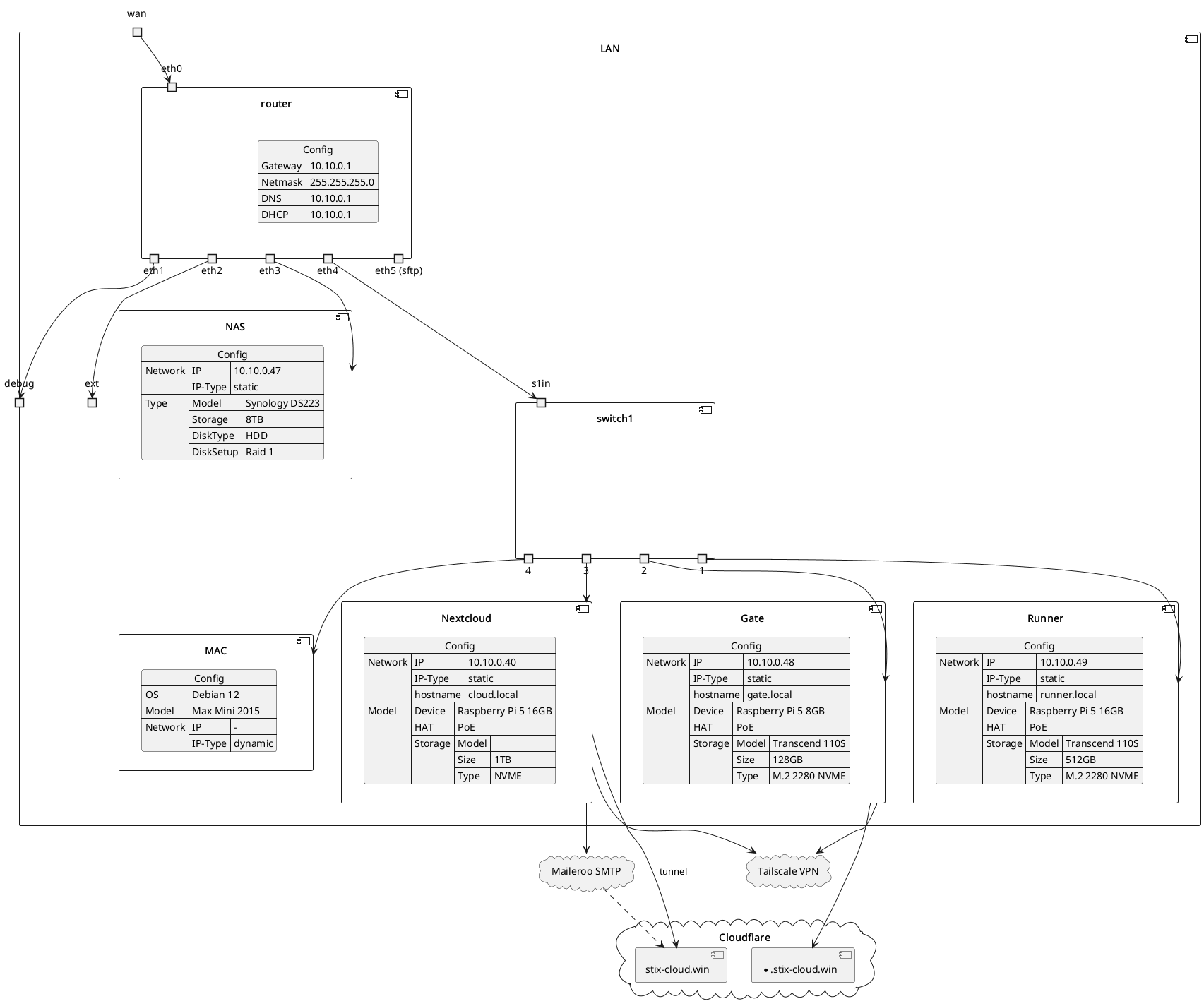
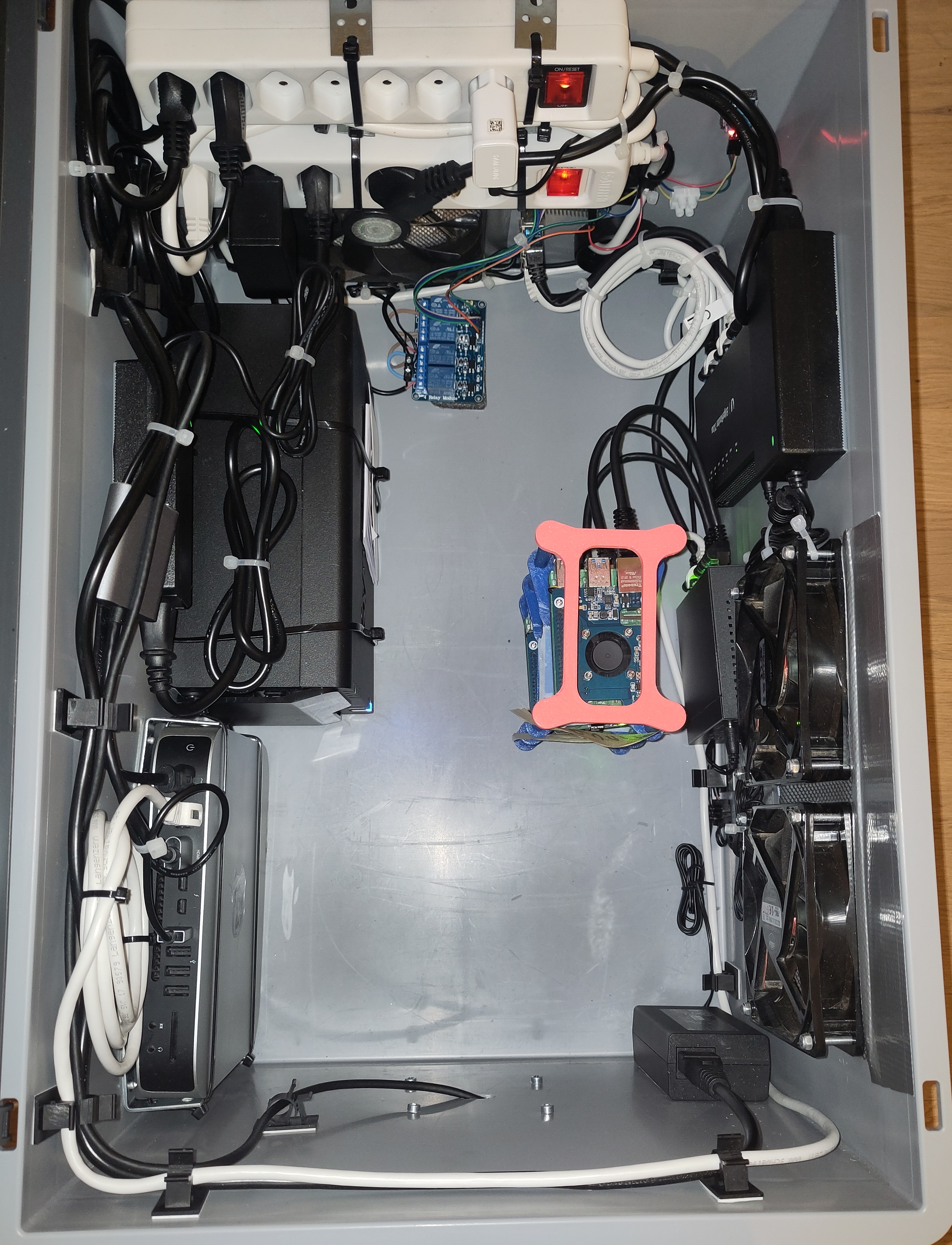
At this point the bedside table was no longer plausible, and absolutely none of my gear was rack-mountable. So I did the only sensible thing: bought a big plastic storage box, mounted case fans to it, and built a thermal controller out of a relay module, a Pi Pico, and a temperature/humidity sensor. When it hit ~40°C the fans came on. On or off, nothing fancy:
1
2
3
4
5
# the entire thermal management strategy
if temperature_c >= 40:
    relay.on()   # fans on
else:
    relay.off()
The photo below is that box. The cable management is doing its best.
Docker Compose, or: death by a thousand port bindings
With three Pis I had far more compute than I needed, so I finally moved to containers. The deployment “system” was charmingly primitive: a systemd unit running a bash script that walked a directory and brought up every Compose file it found.
1
2
3
4
5
#!/usr/bin/env bash
# the entire "orchestration layer"
for dir in /opt/stacks/*/; do
  (cd "$dir" && docker compose up -d)
done
Nginx sat in front as a reverse proxy, routing subdomains, and the Cloudflare tunnel pointed at nginx with a wildcard DNS record. Nextcloud, notably, stayed barebone on its original Pi with its own tunnel, I never containerized it here. So I had two Pis running Compose stacks, one of which doubled as the proxy, plus a snowflake Nextcloud box off to the side.
Looking back, it was held together with intent and very little else. Every new service was a ritual: write the Compose file, pick ports that weren’t already taken, bind them, add an nginx server block, wire the config, point it at ip:port or localhost:port, reload, and pray. I had real downtime. I spent real evenings fixing things that should never have broken.
The whole experience planted the idea that would send me into the Kubernetes detour: what if the cluster managed this for me?
Going off-grid (the part I’m actually proud of)
Before that detour, a tangent that became a personality trait.
I wanted a UPS. Everything in the affordable bracket (up to ~200 CHF) was either ugly, weak, or a poor fit for my pile of random power bricks. So I stopped looking for a UPS and started looking at camping power stations, and bought an EcoFlow River 3 (245Wh).
It has pass-through with a ~10ms switchover, up to 300W delivery, and, the part that hooked me, it can be topped up from a 12V car port or solar. In my head, that completed a picture: a homelab that didn’t depend on the grid.
Power was only half of “independent,” though. A homelab with battery but no WAN isn’t really a homelab, it’s a warm box humming to itself in the dark. If the mains went, my WAN went with it, and the lab would sit there fully powered and completely unreachable. So: a prepaid SIM and a cellular router. I started cheap with a Strong 4G LTE 350M router wired into the EdgeRouter as a failover WAN. It did not work. The Cloudflare tunnels refused to re-establish over it correctly, and the Strong is about as configurable as a brick, so I couldn’t debug my way out.
I replaced it with a Teltonika RUTX11, which does SIM plus WAN failover out of the box, and which I have loved unreservedly since. I migrated off the EdgeRouter entirely and let the Teltonika be the brain.
The payoff came later, and it was glorious: I transported the entire running homelab six hours by car, not even plugged into the car’s 12V, just coasting on the EcoFlow, cellular for WAN, without a single minute of downtime. Services stayed up the whole drive. That is still the single most satisfying thing this project has ever done.
The off-grid stack, for the record:
Power: EcoFlow River 3: 245Wh, ~10ms pass-through switchover, up to 300W, rechargeable from a 12V car port or solar. WAN: Teltonika RUTX11: prepaid SIM with automatic WAN failover. Field test: six hours in a moving car, on battery and cellular only. Zero downtime.
Kubernetes, and the master node that ate itself
So, the detour. I wanted the Compose chaos to become a cluster: all three Pis plus the Debian Mac mini, self-healing, declarative, grown-up. I landed on k3s.
And I made the mistake the docs gently warn you about. I stood it up with a single master and an external Postgres as the datastore, because at the time the simpler topology sounded like the pragmatic choice. It was the pragmatic choice right up until it was the entire problem.
Migrating Nextcloud onto it was a slog. I kept the data on the NAS via an NFS-backed PVC, and immediately rediscovered the permission gremlins, except now there were more of them. Because I refused to pin Nextcloud to one node, every node needed NFS tooling installed, and every node’s IP had to be in the Synology allow list. And the flannel pod network meant the NAS sometimes saw a 10.42.x.x pod IP instead of a node IP, so that CIDR had to be allowed too:
1
mount.nfs: access denied by server while mounting 10.10.0.47:/volume1/cloud_data
The fix was a pile of caveats, disable the init container’s chown, set the pod to run as UID/GID 33, loosen squash on the NAS, and add the whole pod network to the export:
1
2
# Synology NFS export — allow the flannel pod CIDR
10.42.0.0/16   rw, no_root_squash, async
None of which I’d call clean. But it worked. I ran Portainer for a management overview, added Jenkins for a uni project and a handful of other services, and even wrote a little backup service that dumped the management DB and the config files onto the NAS.
Then my master node started dying.
It would go offline, and when I got to it the Pi 5’s activity LED was blinking yellow in groups of nine, pausing, and doing it again. Nine flashes on a Pi 5 means SPI EEPROM not found or unreadable, a corrupted bootloader EEPROM. The most likely cause, given it went down unexpectedly, is power instability during a PoE auto-repair reboot cycle eating the EEPROM. Reflashing the bootloader from an SD card brought it back.
For a week or two. Then it did it again.
And because I’d built a single-master cluster, every time the master bricked its own bootloader, the whole cluster went down with it. The architecture I’d adopted to make things more resilient had a single point of failure, and that point of failure had developed recurring brain damage.
The correct move was to migrate to embedded etcd with a floating control plane, three servers, a quorum, a VIP. I scoped it out. I also wanted to deploy straight from a git push instead of hand-feeding YAML. And somewhere in scoping the migration I admitted the truth: I didn’t want to do any of this. I didn’t want HA etcd. I wanted something that ran 24/7 and asked for nothing. I dislike Kubernetes YAML with a quiet, sincere passion, and the whole cluster existed to solve a problem I’d mostly invented.
Tearing it down to one box
Two unrelated things pushed the rebuild over the edge. My desktop PC started failing and I needed a fast replacement, so I pulled the old Intel Mac mini out of the lab to use as a daily driver, taking a node with it. And I’d separately bought a Mac mini M4 (24GB) to play with local AI, running Ollama with Tailscale for remote access. I never put Open WebUI on it, because adding any service to the k3s cluster cost me hours, and I’d rather not.
I wanted a single, efficient, Linux-rooted box to replace the Pis. And the “efficient” part wasn’t just a vibe, I’d actually measured it and compared it to hardware I considered. Performance-per-watt across the hardware I’d accumulated wasn’t close:
| Machine | Idle | CPU max | Geekbench 6 multi-core | Score per watt |
|---|---|---|---|---|
| Mac mini M4 Pro (2024, 14-core) | ~5 W | ~65 W | 22,412 | ~345 |
| Minix NEO Z150 (Intel N150) | ~12 W | ~25 W | 3,005 | ~120 |
| Mac mini Late-2014 (i7-4578U) | ~6 W | ~85 W | 1,943 | ~23 |
| Pi 5 cluster | <15 W idle (all nodes) | — | — | — |
Two things jump out. The M4 does around 15× the work per watt of the old Intel mini, and even the fanless little N150 in the Minix manages roughly 5×, both of which matter when your “UPS” is a 245Wh camping battery and every watt-hour spent is runtime you don’t get back. And the Minix idles right about where the entire three-Pi cluster did (~12W against <15W) while comfortably out-computing all of it.
The M4 was staying put as the AI box, and it isn’t Linux anyway; the old Intel mini was now my desktop. That left the Minix. So I bought a Minix NEO Z150-0dB (fanless, 256GB/8GB), and immediately upgraded it from the spare-parts drawer to 500GB and 16GB.
No more k3s. I tried Podman quadlets first and genuinely liked them, but I still had to SSH in for every new service, which was the exact friction I was trying to kill. So I settled on Dokploy: a Docker manager with a UI good enough that I stopped dreading deployments.
I migrated Nextcloud off k3s and back to plain Docker Compose, Postgres, Redis, Nextcloud, with the data still on the NAS, mounted on the host via NFS and bind-mounted in, which sidesteps most of the pod-IP permission nonsense:
1
10.10.0.47:/volume1/cloud_data  /srv/nextcloud  nfs  _netdev,noatime,nfsvers=4,rw,hard,timeo=600,retrans=5,x-systemd.automount,x-systemd.requires=network-online.target  0 0
I finally installed Open WebUI and pointed it at the M4. I kept cloudflared on the host rather than inside Dokploy, against their docs, but far easier for me to reason about, and added the box to Tailscale for remote access from anywhere.
That’s the setup I’m running right now.
Where it stands
A few things I’ve learned living with Dokploy:
- I let it manage the reverse-proxy labels entirely instead of hand-writing traffic rules, the thing I used to spend whole evenings on is now invisible.
- When a service needs an auth gate, I drop an nginx + OAuth proxy into its Compose file.
- I’m running 20+ services on the single Minix and haven’t hit a resource wall yet. Normal usage sits around 5GB including the system; peaks hit ~14GB.
- I switched the M4 from Ollama to oMLX, easier switch than expected, faster, and nicer to manage.
- Everything now authenticates through Keycloak SSO.
On the to-do list: move the last basic-auth services onto SSO via an OAuth proxy; bump the Minix to 4TB so Nextcloud data lives on the internal disk and the NAS becomes a pure backup target (real automated backups this time, incremental weekly, full every month or two, compressed, instead of the “copy to an external disk once a month if I remember” system I’m ashamed to admit is current); 32GB of RAM for headroom on the peaks; a Teltonika RUTX50 for 5G; and eventually folding the old Mac mini, and maybe a Pi or two, back in as Docker Swarm nodes in Dokploy. The recurring-bootloader Pi gets the most fitting retirement I can think of: demoted to a dedicated media stack box, Radarr-to-Plex, where nobody depends on it.
The lesson, such as it is
Every rebuild was me trying to buy stability with complexity, and the bill always came due as more things that could break. The barebone Pi was unstable because it was fragile. The Compose pile was unstable because it was manual. The Kubernetes cluster was unstable because it was Kubernetes, on a Pi, with one master that liked to lobotomize itself.
The current single-box setup is the most stable the lab has ever been, and it’s also the simplest it’s been since the nightstand. That’s not a coincidence, and I don’t think I’ll forget it again. Until, of course, I add the swarm nodes and find a fresh way to make everything worse.
The lab is ongoing. The fan logic is still if temp >= 40. Some things shouldn’t be improved.